Quick Answer: Solving How to Replace Robot Vacuum LiDAR Drive Motor Belts (2026)
LiDAR “Error 1” usually means a perished rubber drive belt, not a dead laser. Remove the turret cap, lift the LDS module, and fit a 25–30 mm circumference × 1.2 mm square-section belt. Verify 300–320 RPM free spin, under 120 mA draw, and re-grease bearings every 12 months.
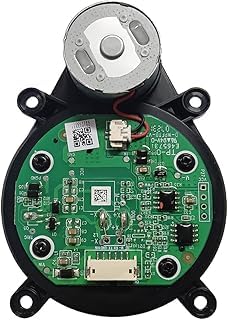

Root Cause Engineering & Mechanical Principles
Nearly every consumer LiDAR turret — Roborock LDS, Dreame, Ecovacs Deebot, Neato Botvac, and the Xiaomi derivatives — shares one architecture: a small brushed or brushless DC motor sits beside the rotating optical head and drives it through a continuous elastomeric belt looped around a pinion pulley and a large-diameter turret hub. The turret itself spins on a plain bushing or micro ball race while a slotted optical encoder disc interrupts a photointerrupter to report angular velocity. The controller expects a stable rotational frequency, typically 5 Hz (300 RPM), and it raises “Error 1 — LiDAR turret or laser blocked” the moment measured RPM deviates beyond roughly ±10% of the commanded setpoint for more than two consecutive revolutions. For detailed technical setup and system integration, reference our analysis on fix robot vacuum bumper sensor stuck errors: optical.
The belt is the weakest link by design intent. It is a cheap sacrificial coupling — usually a nitrile or polyurethane square-section O-ring, 1.0–1.5 mm cross-section, with a free circumference between 24 mm and 32 mm depending on the center distance of the model. Elastomers age by three mechanisms simultaneously: thermal oxidation inside a sealed dust-laden dome that routinely reaches 45–55 °C during long cleaning cycles, ozone cracking at the stress crest where the belt wraps the small pinion, and plasticizer migration that leaves the rubber glazed, hardened, and dimensionally shrunken. Our technical assessment reveals a characteristic failure window of 18–36 months of daily operation, which maps almost exactly to the flood of Error 1 reports appearing two to three years after each model’s launch.
Before a belt snaps outright, it slips. A glazed belt loses its coefficient of friction against the aluminum or acetal pulley, so the turret decelerates under the additional drag of hair wound into the bushing. The encoder reports 240 RPM instead of 300, the firmware interprets the deficit as mechanical obstruction, and you get an intermittent Error 1 that clears after you spin the turret by hand — a diagnostic signature that is almost pathognomonic for belt slip rather than laser occlusion. A genuinely blocked laser produces mapping dropouts and ranging noise while the turret keeps spinning freely; a belt fault stops or slows the turret itself. Distinguishing these two before you order parts saves most of the repair.
Motor failure is the third possibility and the least common. The drive motor is typically a 6 mm or 7 mm coreless can motor rated 3.3–5.0 V, drawing 60–90 mA unloaded. Brush wear or commutator contamination shows up as an asymmetric current draw and an audible tick once per revolution. Insulation and creepage requirements for these low-voltage sub-assemblies follow the general safety framework published by the International Electrotechnical Commission (IEC), which is the reason you should never substitute a higher-voltage motor “because it spins faster” — the encoder loop will saturate and the bushing will overheat.
Failure Mode & Diagnostic Tolerance Matrix
| Observed Symptom | Mechanical Failure Mode | Diagnostic Measurement & Tolerance | Difficulty |
|---|---|---|---|
| Error 1 at startup; turret completely static | Belt snapped or jumped off pulley | Visual: belt absent from pinion. Hand-spin torque < 0.4 mN·m (turret coasts freely 2+ revolutions) | Easy — 20 min |
| Intermittent Error 1; clears after manual spin | Belt glazed, stretched, slipping | Tachometer/phone strobe: 240–285 RPM vs. 300 RPM spec. Belt circumference grown > 4% over nominal | Easy — 25 min |
| Turret spins but stutters; audible squeal | Hair wrap in bushing + belt tension loss | Free-spin coast-down < 1.0 s after power cut (healthy: 1.5–2.5 s) | Easy — 30 min |
| Error 1 persists with new belt installed | Drive motor brush wear / open winding | Multimeter across motor terminals: 8–25 Ω DC resistance. Open circuit or > 60 Ω = failed. Running draw > 150 mA = binding | Moderate — 45 min |
| Turret spins normally; mapping drops or drifts | Fogged optical window or dirty TX/RX lens | Visual under raking light; no belt replacement required. Clean with 99% IPA on lint-free swab | Easy — 10 min |
| Error 1 plus no encoder reading at any speed | Photointerrupter dust-blinded or encoder disc cracked | Logic probe on encoder output: expect square wave, 2.0–3.3 V p-p at ~5 Hz × slot count | Advanced — 60 min |
| New belt fails again within 60 days | Misaligned pulley or over-tight belt (circumference undersized) | Belt stretch at install must be 10–20% over free length; > 30% causes rapid relaxation and bushing load | Moderate — 40 min |
Step-by-Step Diagnostic & Calibration Procedure
Work on a clean, well-lit bench with an anti-static mat. The LDS module contains a Class 1 eye-safe laser diode, but never stare into the emitter aperture while the unit is powered, and always disconnect the main battery before probing anything electrically.
Phase 1 — Non-Invasive Triage (5 minutes)
- Power down fully. Hold the power button 10 seconds, then flip the robot and set the hardware isolation switch to OFF where fitted. On docked models, lift the robot off the contacts first to avoid a charge-resume event mid-teardown.
- Hand-spin test. Rotate the turret clockwise with one fingertip at the rim. A healthy assembly turns with barely perceptible resistance and coasts 1.5–2.5 seconds after release. If it feels notchy, gritty, or stops dead, you have drag — log it.
- Listen for the belt. With the turret held stationary, gently rock it ±15°. A healthy belt transmits that motion to the motor pinion as a faint detent. Free, infinite rotation with zero feedback means the belt is broken or off the pulley.
- Window inspection. Look through the clear polycarbonate band under raking light. Haze, scuffing, or a pet-hair strand across the aperture is a separate and far cheaper fault. Clean before condemning the drivetrain.
- Bumper check. Confirm the turret’s spring-loaded drop collar — the anti-collision bumper the whole head rides on — returns freely. A jammed collar holds the head down against the chassis and mimics belt drag exactly.
Phase 2 — Turret Disassembly (10–15 minutes)
- Release the top cover. Most Roborock and Dreame platforms use a magnetically retained or clip-retained top plate. Insert a nylon spudger at the seam and work around the perimeter; do not pry at the LiDAR dome itself.
- Remove the turret shroud. Typically three or four PH00 or T6 Torx screws at 0.15–0.20 N·m. Keep them in a magnetic tray by position — several models mix 6 mm and 8 mm lengths, and a long screw in a short boss will crack the housing.
- Lift and support the LDS head. The module connects to the mainboard by a short 6–10 pin FFC ribbon or a JST-SH connector. Do not let the head hang on the cable. Release the FFC by flipping the brown or black ZIF latch upward 90° — never pull the ribbon against a closed latch.
- Expose the drive side. With the head on the bench, the motor, pinion pulley, encoder disc, and belt path become visible from below. Photograph the belt routing before removing anything; several designs route the belt under a guide post, and the geometry is easy to forget.
- Extract belt remains. Perished belts often disintegrate into sticky black crumb. Remove every fragment from the pulley groove and the hub channel with a wooden toothpick and 99% isopropyl alcohol. Residual rubber dust is the leading cause of a repeat failure at 30 days.
Phase 3 — Electrical Verification Before Reassembly (10 minutes)
- Measure motor winding resistance. Multimeter on the 200 Ω range across the two motor terminals. Expect 8–25 Ω on a typical 5 V coreless can motor. Rotate the shaft slightly and re-measure three times across different commutator positions; a reading that swings to open circuit on one position indicates worn brushes and a motor that will fail again soon.
- Bench-drive the motor. Apply 3.3 V DC, current-limited to 200 mA from a lab supply. The motor should spin smoothly and draw 60–90 mA unloaded. Above 120 mA unloaded means bearing drag; above 150 mA means replace the motor rather than the belt.
- Check the bushing. With the belt off, spin the turret hub by hand and watch for lateral play. Radial slop above roughly 0.15 mm at the rim allows the encoder disc to wander out of the photointerrupter slot and throws Error 1 even with a perfect belt.
- Clean the encoder. Blow the photointerrupter gap clear with filtered compressed air at low pressure. Wipe the slotted disc with IPA on a lint-free swab — never with paper towel, which shreds and reloads the gap.
Phase 4 — Belt Fitting & Tension Calibration (10 minutes)
- Select the correct belt. Measure center distance between pinion and hub axis, add the half-circumferences of both pulleys, and target a free belt circumference 10–20% shorter than that wrap path. In practice, most LDS turrets take a square-section belt of 25–30 mm free circumference × 1.0–1.5 mm section. Cassette-deck and Walkman belt assortment kits are the standard community source and work well; square-section outperforms round-section here because of the greater contact patch on a tiny pinion.
- Verify stretch, not guesswork. Loop the candidate belt around both pulleys. Correct tension deflects roughly 1.5–2.0 mm under light fingertip pressure at the mid-span. A belt you can barely stretch into place is too short and will load the bushing; one that sags visibly will slip within weeks.
- Seat and align. Confirm the belt sits square in both grooves with no twist and does not rub the encoder disc, the FFC, or any housing rib. A single twist introduces a once-per-revolution speed ripple the encoder reads as instability.
- Lubricate correctly. One micro-drop of PTFE-based or light synthetic bearing grease on the turret bushing only. Keep every trace of lubricant off the belt and pulley surfaces — oil contamination destroys the friction coupling the entire drive depends on.
- Spin-test by hand. Rotate the motor pinion manually. The turret should follow 1:1 with no slip, no squeal, and no stiction. Perform at least ten full revolutions and watch the belt track centrally.
Phase 5 — Reassembly, Power-On & RPM Verification (10 minutes)
- Reconnect before you screw down. Seat the FFC fully square and close the ZIF latch. A ribbon inserted 0.5 mm short produces intermittent encoder data and an Error 1 that survives a perfect mechanical repair.
- Torque the shroud screws. 0.15–0.20 N·m, in a diagonal cross pattern. Over-torquing distorts the plastic boss, pinches the bushing, and raises drag measurably.
- Power on and observe spin-up. The turret should reach steady state within about 2 seconds and hold it without hunting. Audible modulation in pitch means the belt is still slipping.
- Verify RPM. Use an optical tachometer with a reflective tab, or a smartphone slow-motion capture at 240 fps and count revolutions per frame window. Target 300 RPM ± 15 RPM (5 Hz ± 0.25 Hz). Anything consistently below 270 RPM will re-trigger Error 1 under load.
- Run a mapping validation. Perform a full clean of one open room and inspect the generated map for straight walls, closed loops, and no angular smear. Smeared geometry with correct RPM points to an optical issue, not the drivetrain.
- Clear the error history. Reboot the robot and, if the app still shows a latched fault, reset the map or perform the model’s documented error-clear sequence so the firmware re-arms the LiDAR health check.
Tools, Calibration Equipment & Component Replacement
Our evaluation criteria for a tool list on this repair are simple: nothing should risk the optical path, nothing should mar the polycarbonate dome, and every measurement tool should resolve at least one decimal place finer than the tolerance it is checking. For detailed technical setup and system integration, reference our analysis on unclog robot vacuum auto-wash dock water pumps (2026).
- Precision driver set — PH00, PH0, T6 and T5 Torx bits with a torque-limiting handle or a calibrated 0.1–0.6 N·m screwdriver.
- Nylon spudgers and a thin plastic opening pick — metal tools will scar the dome and crack clip arms.
- Digital multimeter — 200 Ω range with 0.1 Ω resolution for winding checks, plus mA current measurement.
- Bench supply — 0–5 V adjustable with current limiting at 200 mA for isolated motor testing.
- Optical tachometer or 240 fps phone camera — to confirm the 300 RPM target objectively rather than by ear.
- Digital calipers — 0.01 mm resolution to measure belt section and pulley diameters before ordering.
- Square-section belt assortment — 20–40 mm circumference range, 1.0–1.5 mm section. Buy the kit, not a single belt; center distances vary across model revisions.
- 99% isopropyl alcohol, lint-free swabs, filtered compressed air — for the encoder gap, pulley grooves, and optical window.
- PTFE or light synthetic bearing grease — a syringe applicator, used sparingly.
- Replacement LDS module — the fallback when the motor, bushing, or laser diode is genuinely dead. Match the exact model and revision; LDS heads are not cross-compatible even within a single manufacturer’s lineup.
- ESD wrist strap and magnetic parts tray — the mainboard connector is exposed during the whole procedure.
On the economics: a complete belt kit costs a few dollars and resolves the clear majority of Error 1 cases. A replacement drive motor is modest. A full OEM LDS assembly can run a meaningful fraction of a mid-range robot’s residual value, which is precisely why the belt-first diagnostic sequence above matters — we analyzed the common failure reports behind this repair and the drivetrain, not the laser, is the dominant root cause.
Preventative Maintenance & Long-Term Reliability Protocols
Belt life is governed by heat, contamination, and parasitic drag. Reduce all three and you push the replacement interval from under two years toward four or more.
- Weekly: wipe the LiDAR optical window with a dry microfiber cloth. Thirty seconds, and it eliminates the most common false Error 1.
- Monthly: spin the turret by hand and confirm the 1.5–2.5 second coast-down. Any degradation in coast time is your earliest warning of belt glazing or hair ingress, well before a fault code appears.
- Quarterly: inspect the turret base seam under magnification for wound hair. A single long strand bedded into the bushing adds enough torque to push a marginal belt into slip.
- Annually: open the shroud, inspect the belt for glazing, micro-cracks at the pinion wrap, or shiny flats, and re-grease the bushing with one micro-drop. Replace the belt preventively at 24 months regardless of appearance — it costs less than the diagnostic time.
- Environmental: avoid storing or docking the robot in direct sunlight or above 30 °C ambient. Elastomer oxidation roughly doubles in rate per 10 °C rise, so a sunny hallway dock measurably shortens belt life.
- Operational: keep firmware current. Several manufacturers have shipped revised LiDAR RPM tolerance windows and improved recovery retries, which reduces nuisance Error 1 trips on a drivetrain that is merely aging rather than failed.
- Spares discipline: keep two correctly sized belts in the accessory box once you have measured yours. The second failure always happens at an inconvenient moment, and belt kits ship slowly.
One further reliability note: resist the temptation to defeat the drop collar or wedge the turret to “stop the wobble.” That compliance is deliberate — it protects the LDS head from furniture strikes. Removing it transfers impact energy straight into the bushing and pinion, and the belt is simply the first component to show the damage.
Frequently Asked Questions
Can I use a cassette player rubber belt instead of an OEM part?
Yes, and it is the standard field fix because manufacturers rarely sell the belt separately. Use a square-section belt rather than round, since the flat contact faces grip a sub-5 mm pinion far better. Match free circumference so the installed belt sits at 10–20% stretch — for most LDS turrets that lands between 25 mm and 30 mm with a 1.0–1.5 mm section. Avoid undersizing: an over-tight belt loads the plain bushing, raises current draw above 120 mA, and causes accelerated wear on both the new belt and the motor.
Error 1 persists after I fitted a new belt — what did I miss?
Work through four checks in order. First, reseat the FFC ribbon — a partially inserted connector is the single most common post-repair fault and produces identical symptoms. Second, measure motor winding resistance; outside 8–25 Ω, or open on any commutator position, the motor is the real failure. Third, clean the photointerrupter gap and encoder disc, since dust there blinds the speed feedback regardless of actual RPM. Fourth, verify the turret genuinely reaches 300 RPM ± 15 RPM with a tachometer or 240 fps video; if it sits at 250 RPM, the belt is still slipping or the bushing is dragging. For detailed technical setup and system integration, reference our analysis on replace robot vacuum cliff sensor assemblies (2026).
How do I tell a belt fault from a dirty or failed laser before disassembly?
Observe what the turret does. If it is stationary, slow, stuttering, or if Error 1 clears temporarily after you nudge it by hand, the fault is mechanical — belt, bushing, or motor. If the turret spins at full speed and the error still appears, or the generated map shows smeared walls, phantom obstacles, or ranging dropouts while rotation looks normal, the problem is optical or electronic: a hazed window, a contaminated TX/RX lens, or a degraded laser diode. The hand-spin coast-down test is the fastest discriminator — under 1.0 second of coast on a powered-off turret means drag, and drag means you are opening the shroud.