

Quick Verdict: For local AI, budget roughly 8-12GB VRAM for small 8B models at Q4, 16GB for ComfyUI FLUX at fp8 and 14B models, 24-32GB for 32B models at Q8 or 70B at Q4 with tight context, and 48-96GB for multi-card 70B work with full context or fine-tuning. Capacity decides what loads, while bandwidth decides how fast it runs.
Pros
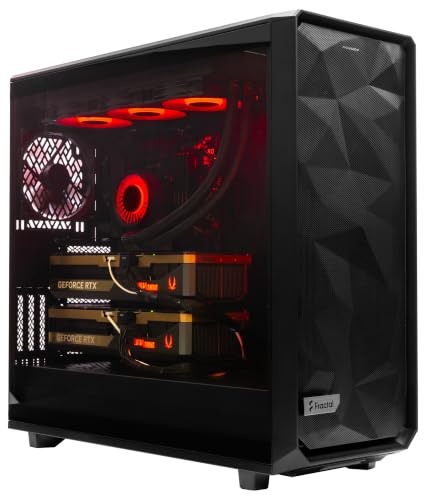
- Two RTX 5090 graphics cards in one system
- 16-core Ryzen 9-9950X3D2 processor listed at 4.3GHz
- 8TB NVMe storage in 2x4TB RAID configuration
- 256GB DDR5 memory
- Liquid cooling and Windows 11 Pro included
Cons
- Power, case and cooling requirements are not specified
- Dual GPU builds may need careful power and airflow planning
- Liquid cooling may add coolant and pump upkeep
The ArsenalPC MES2X is a prebuilt dual-GPU workstation aimed at multi-GPU compute and heavy professional workloads. Its main value is having two RTX 5090 cards, a 16-core processor, 256GB DDR5 memory and 8TB of NVMe storage in one liquid-cooled, Windows-ready system. Buyers should verify power, case clearance and cooling requirements against their space and electrical setup, since the record does not list them.
- Processor: AMD Ryzen 9-9950X3D2, 16 cores, 4.3GHz as listed
- Graphics: Two GeForce RTX 5090 graphics cards
- Storage: 8TB NVMe SSD, listed as 2x4TB RAID
- Memory: 256GB DDR5
- Cooling: Liquid cooled
- Operating system: Windows 11 Pro

Pros
- RTX 5090 with 32GB VRAM
- Ryzen 9 9950X3D processor listed
- 64GB DDR5 RAM and 4TB storage
- Wi-Fi 7 networking included
- Rated 1200W Gold ATX 3 power supply
Cons
- High-end GPU and CPU may need strong cooling and power
- Prebuilt configuration may limit later component upgrades
The Skytech Gaming Legacy 4 suits buyers who want a ready-built, high-end desktop for demanding games and GPU-accelerated work. Its listed components are strong on paper, but the record has no measured results, so verify power, cooling and space requirements and the exact configuration before purchase.
- NVIDIA RTX 5090 with 32GB VRAM
- AMD Ryzen 9 9950X3D, listed at 4.3GHz
- 64GB DDR5 RAM, listed at 6000
- 4TB Gen4 NVMe SSD
- X870 motherboard
- 1200W Gold ATX 3 power supply

Pros
- Prebuilt configuration with listed CPU, GPU and memory
- Liquid cooling listed in the product title
- 2TB M.2 SSD listed for large storage capacity
- 32GB DDR5 memory listed for multitasking
Cons
- Record lacks dimensions, port details and warranty information
- Liquid cooling may add upkeep not described in the record
This prebuilt Corsair system pairs a listed Intel Core i9-14900KF processor and NVIDIA GeForce RTX 5080 graphics with 32GB DDR5 memory and a 2TB M.2 SSD. It fits buyers who want a configured gaming desktop with liquid cooling as part of the stated design. Before buying, confirm case size, connectivity and warranty terms, since the supplied record does not include them.
- Processor: Intel Core i9-14900KF
- Graphics: NVIDIA GeForce RTX 5080
- Memory: 32GB Vengeance RGB DDR5
- Storage: 2TB M.2 SSD
- Cooling: Liquid cooled, as listed in the title
- Color: Black
How VRAM Capacity Determines Whether a Model Loads
VRAM is the single most constraining resource in a local AI workstation. A model that does not fit entirely within GPU memory either fails to load or spills layers into system RAM, which dramatically reduces throughput. Before choosing hardware, you need a reliable estimate of the memory footprint your target workload will consume. That footprint has three main components: the model weights, the KV cache that grows with context length, and the runtime overhead of the inference framework and CUDA allocations.
For dense transformer models, the weight footprint is approximately the parameter count multiplied by the bytes per parameter for the chosen quantization. FP16 uses 2 bytes per parameter, Q8 roughly 1 byte, and Q4 variants around 0.5 bytes plus scaling metadata. In practice, GGUF Q4_K_M files land closer to 0.6 bytes per parameter once block scales are included. An 8B model at Q4 therefore needs about 5 GB for weights alone, a 32B model at Q8 needs roughly 34 GB, and a 70B model at Q4 needs around 42 GB before any context is allocated.
The KV cache is the variable that most builders underestimate. Its size scales linearly with context length, the number of layers, the number of KV heads, and the head dimension, and it is multiplied by the number of concurrent sequences you serve. Grouped-query attention, now standard in most open-weight models, substantially reduces this cost compared with older multi-head designs. Even so, long contexts can consume many gigabytes, which is why a model that technically fits at 4K tokens may fail at 32K. For a step-by-step method applied to large models, see our guide on calculating 70B model KV cache.
The Four VRAM Threshold Tiers for Local AI
Based on the weight and cache arithmetic above, and on the memory profiles documented in manufacturer specifications and open inference runtime references, local AI workloads cluster into four practical tiers. Each tier represents a capacity band where a particular class of model becomes viable without severe compromises.
Tier 1: 8GB to 12GB. This band supports small language models in the 7B to 8B range, but only at aggressive quantization such as Q4_K_M, and with modest context windows. Expect limited headroom for batching and a hard ceiling on context length. This tier is adequate for experimentation, lightweight assistants, and code completion on a single user, but it is not appropriate for image generation at the quality levels current diffusion models target.
Tier 2: 16GB. Sixteen gigabytes is the practical entry point for image generation pipelines. ComfyUI workflows running FLUX at fp8 precision fit within this budget once text encoders are offloaded appropriately. This tier also handles 14B-class language models at Q4 or Q5 with reasonable context. It represents a sensible minimum for a dedicated AI workstation where you expect to run more than one kind of model.
Tier 3: 24GB to 32GB. This is the most important tier for serious local inference. A 24GB card comfortably runs 32B-class models at Q4, and a 32GB card opens the door to 32B models at Q8, which preserves noticeably more output fidelity than Q4 for reasoning-heavy tasks. At this capacity, a 70B model at Q4 becomes possible, but only with tight context limits and partial offload strategies. For a direct comparison of the 24GB and 32GB options, read our 32GB vs 24GB VRAM workstation analysis.
Tier 4: 48GB to 96GB. Multi-card arrays or professional-class single cards in this band support 70B models with full context, batched serving, and parameter-efficient fine-tuning such as LoRA on mid-sized models. Fine-tuning consumes substantially more memory than inference because gradients, optimizer states, and activations must be held alongside the weights. Builders targeting this tier should plan for interconnect bandwidth between cards, since tensor parallelism across PCIe introduces communication overhead. A representative configuration is discussed in our review of the dual RTX 5090 64GB rig performance profile.
VRAM Requirements by Model and Quantization
The following table consolidates estimated memory requirements for common workloads. Figures represent approximate weight footprints plus a moderate KV cache allowance at 8K context and assume a single active sequence. Actual usage varies with the runtime, attention implementation, and batch size, so treat these numbers as planning baselines rather than guarantees.
| Workload | Parameters | Precision or Quantization | Approx. Weight Size | Recommended VRAM Tier | Context Notes |
|---|---|---|---|---|---|
| Small chat or code model | 7B to 8B | Q4_K_M | 4.5 to 5 GB | 8GB to 12GB | Up to about 8K comfortably |
| Mid-size general model | 14B | Q4_K_M | 8 to 9 GB | 16GB | 8K to 16K with headroom |
| FLUX image generation | 12B diffusion | fp8 | About 12 GB | 16GB | Text encoder offload advised |
| Large reasoning model | 32B | Q4_K_M | About 19 to 20 GB | 24GB | 8K to 16K typical |
| High-fidelity 32B | 32B | Q8_0 | About 34 GB | 32GB or split across cards | Limited by remaining headroom |
| Very large model, constrained | 70B | Q4_K_M | About 40 to 42 GB | 48GB or 24GB with CPU offload | Tight context, partial offload |
| Very large model, full context | 70B | Q4_K_M or Q8 | 42 GB to 75 GB | 64GB to 96GB multi-card | Full context with batching |
| Fine-tuning mid-size model | 7B to 13B | LoRA over 4-bit base | Varies widely | 24GB to 48GB | Activations dominate memory |
Memory Bandwidth Versus Memory Capacity
Capacity and bandwidth are often conflated, yet they govern different aspects of performance. Capacity determines whether a model and its cache can reside on the GPU at all. Bandwidth determines how quickly the GPU can stream those weights through its compute units during each generated token. During autoregressive decoding, token generation is typically memory-bound, meaning throughput is limited by how fast weights are read from VRAM rather than by raw arithmetic capability.
This relationship has a practical consequence. Two cards with identical capacity can deliver very different tokens-per-second figures if their memory subsystems differ. Conversely, a card with higher bandwidth cannot run a model that exceeds its capacity, no matter how fast it reads. Prefill, the processing of the input prompt, is more compute-bound and benefits from tensor throughput, while decode benefits from bandwidth. A balanced purchasing decision weighs both, but the capacity threshold should be satisfied first. Only after confirming a model fits should you optimize for bandwidth to improve interactive responsiveness.
Bandwidth also becomes critical in multi-card configurations. When a model is split across GPUs, each generated token requires data to traverse the interconnect between cards. Aggregate capacity increases, but per-token latency can rise if the link is slow. This is why multi-GPU planning requires attention to the platform’s PCIe lane allocation and, where supported, high-speed peer-to-peer connectivity. Architectural standards for high-performance interconnects and memory hierarchy design are documented by the IEEE High Performance Computing Architecture Standards, which provide useful background for understanding these tradeoffs.
Quantization as a Lever for Fitting Models
Quantization is the most effective tool for reducing VRAM requirements without changing the model architecture. Moving from FP16 to Q8 halves the weight footprint with minimal perceptible quality loss for most tasks. Moving from Q8 to Q4 halves it again, with a more noticeable effect on reasoning, long-form coherence, and factual precision, particularly in smaller models. Q5 and Q6 variants occupy intermediate points on this curve. For a 32B model, the difference between Q4 and Q8 is roughly fifteen gigabytes, which is often the margin that determines whether a 32GB card can run the model with a usable context window.
When selecting a quantization level, prioritize the largest model you can run at Q4 or Q5 over a smaller model at Q8, unless your task is precision-sensitive. A 70B model at Q4 frequently outperforms a 32B model at Q8 on broad benchmarks, though the difference depends on the task mix. Always validate quality on your own prompts rather than relying solely on aggregate scores.
Image Generation and Multimodal Memory Budgets
Diffusion pipelines carry a different memory profile from language models. The denoising network, the text encoders, and the variational autoencoder each occupy space, and intermediate activations scale with output resolution. Higher resolutions and larger batch sizes raise peak memory substantially. ComfyUI offers node-level offloading that moves idle components to system RAM between stages, which allows a 16GB card to run pipelines that would otherwise exceed it. Expect slower generation when offloading is active, since data must move across the PCIe bus. Multimodal models that combine vision encoders with language backbones follow similar logic, with the vision component adding a fixed overhead that should be included in your estimate.
Practical Sizing Procedure
To size VRAM for a specific workload, begin by listing every model you intend to run and the quantization you plan to use. Calculate the weight footprint using the parameter count and bytes-per-parameter for that format. Add a KV cache allowance based on your maximum context length and expected concurrency. Add a fixed overhead of roughly one to two gigabytes for the runtime and CUDA context. Sum these values and add a headroom margin of around fifteen to twenty percent to accommodate fragmentation and transient allocations. The resulting figure identifies your minimum viable tier.
Then consider whether your workflow includes fine-tuning, which can multiply requirements, and whether you expect to run models concurrently, which requires the sum of their footprints rather than the largest single one. Finally, evaluate the platform around the GPU. The decision between a desktop build, a compact AI system, or a portable configuration affects thermal headroom, expandability, and sustained performance. Our framework for choosing AI hardware platforms addresses these considerations in detail.
Sustaining a High-VRAM Workstation
High-capacity workstations often run sustained workloads for hours, which places demands on cooling, power delivery, and peripheral health. A system that spends long sessions generating images or streaming tokens may also drive a primary display continuously, and static interface elements on OLED panels can accumulate wear over time. Establishing routine display maintenance, including pixel refresh cycles, brightness management, and screen-rotation habits, protects the monitor that you rely on to evaluate outputs. Our notes on workstation display health protocols outline practical measures for this purpose.
Power supply headroom deserves similar attention. High-capacity cards draw substantial sustained power during inference, and multi-card configurations multiply that load. Size the power supply with margin above the combined board power of all installed GPUs plus the rest of the system, and verify that the case airflow can sustain those loads without thermal throttling, which would otherwise reduce the bandwidth advantage you paid for.
Final Sizing Recommendations
For most individual builders, 24GB represents the best balance of capability and cost, since it supports the strongest widely used 32B models at Q4 and offers reliable headroom for image generation. Builders who prioritize higher-fidelity reasoning should target 32GB to run 32B models at Q8. Those who need 70B models with full context, batched serving, or fine-tuning should plan for 48GB or more, either through a professional card or a carefully engineered multi-GPU array. Above all, verify each figure against the specific runtime and context length you intend to use, because the arithmetic above is a planning tool that must be confirmed in practice against your own workload.









