

Quick Verdict: The AMD Threadripper PRO 9995WX leads on raw core density, PCIe lane count, and 8-channel memory bandwidth, making it the stronger host for multi-accelerator AI rigs driving four 600W cards. Intel’s Xeon W-3400 series offers lower per-core latency and a more mature enterprise platform ecosystem, which can benefit latency-sensitive workloads.

Pros
- 96-core Threadripper PRO 9995WX processor
- 384GB RAM for large datasets
- RTX PRO 6000 graphics listed
- 4TB Gen5 SSD plus 12TB HDD
Cons
- Power, cooling, and noise details are not listed
- High-end configuration may need dedicated power and space planning
A top-tier workstation for users with highly parallel, GPU-accelerated, and very large-memory workloads. Buyers should confirm power, cooling, and noise details directly before committing to a setup.
- Processor: Threadripper PRO 9995WX, 96-core
- Graphics: RTX PRO 6000
- Memory: 384GB RAM
- Storage: 4TB Gen5 SSD and 12TB HDD
- Operating system: Windows 11 Pro (W11P)
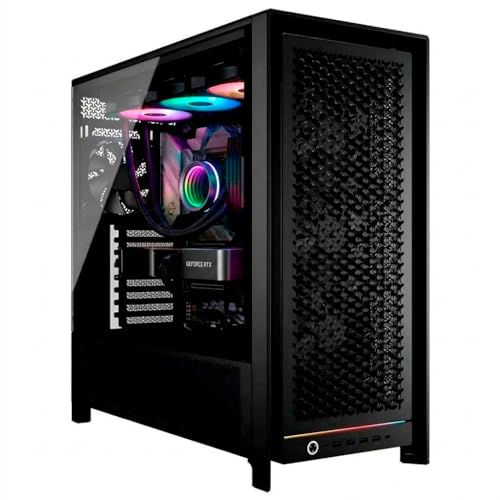
Pros
- 24-core Threadripper 9960X processor
- 64GB ECC Registered DDR5 memory
- 1TB NVMe Gen4 SSD plus 8TB HDD
- RTX 5070 12GB graphics card
Cons
- Listed 1200W power supply needs suitable electrical planning
- Liquid cooling may add maintenance compared with air cooling
This prebuilt workstation suits buyers who want a high core count processor, ECC Registered memory and an RTX 5070 in one configured system. Confirm that the listed 1200W power supply, liquid cooling and advertised 4.4GHz clock match your room, electrical setup and workload.
- Processor: AMD Ryzen Threadripper 9960X, 24 cores
- Clock speed: 4.4GHz (advertised)
- Memory: 64GB DDR5 ECC Registered
- Storage: 1TB NVMe Gen4 PRO SSD, 8TB HDD
- Graphics: GeForce RTX 5070 12GB
- Power supply: 1200W
Choosing a host processor for serious AI work has become a platform decision rather than a simple CPU decision. When the target is 70B-plus parameter checkpoints, multi-GPU inference, or continuous fine-tuning, the CPU determines how many PCIe lanes are available for accelerators, how many memory channels feed the data pipeline, and how efficiently work is distributed across non-uniform memory domains. This comparison examines AMD’s Threadripper PRO 9995WX against Intel’s Xeon W-3400 series, specifically the W9-3495X, through the lens of those constraints. For readers still deciding between a workstation and a smaller system, our guide on AI workstation vs laptop architectural differences outlines where the platform tiers diverge.
This analysis draws on manufacturer specifications, published technical whitepapers, and verified user feedback from enterprise and prosumer deployments. Where performance figures are discussed, they are framed as directional expectations derived from architectural characteristics and reported results, not as independently benchmarked outcomes.
Architectural Foundations: Zen 5 and Golden Cove at Workstation Scale
The Threadripper PRO 9995WX is built on AMD’s Zen 5 microarchitecture and ships with 96 cores and 192 threads. Zen 5 brings improved instruction throughput per clock, wider execution resources, and a refined cache hierarchy compared with Zen 4, which matters for the dense vector and integer workloads common in tokenization, data preprocessing, and checkpoint serialization. The processor exposes 128 PCIe Gen 5 lanes, a figure that directly determines how many accelerators can run at full x16 bandwidth without lane bifurcation.
The Xeon W9-3495X sits in Intel’s W-3400 family and is built on Golden Cove cores. It offers 56 cores and 112 threads, with 112 PCIe Gen 5 lanes. Golden Cove provides strong single-thread performance and a large per-core cache allocation, and Intel’s mesh interconnect is designed to keep latency predictable across the die. The trade-off is a substantially lower core count, which narrows the margin available for parallel data loading and host-side orchestration when several accelerators are saturated simultaneously.
Memory Subsystem: 8-Channel DDR5 ECC and Aggregate Bandwidth
Memory bandwidth is frequently the limiting factor in large-model inference and in fine-tuning pipelines that stream optimizer states and activations from host RAM. The Threadripper PRO platform supports eight channels of DDR5 ECC memory, while the W-3400 platform also supports eight channels of DDR5 ECC. Both platforms therefore offer comparable theoretical peak bandwidth at equivalent memory speeds, and the practical difference lies in how efficiently that bandwidth is consumed under load.
Because the Threadripper PRO platform carries more cores against the same channel count, bandwidth per core is lower, which becomes a consideration when many threads contend for memory simultaneously during data loading. Conversely, the Xeon’s smaller core count gives each thread a larger share of available bandwidth. Users planning memory population should note that achieving full eight-channel speeds requires one DIMM per channel, and that higher capacity configurations may force speed derating. For a broader treatment of how memory capacity translates to model fit, see our guide on sizing GPU VRAM for local LLMs, which covers the complementary constraint on the accelerator side.
NUMA Topology and Memory Latency Across Nodes
Both platforms expose non-uniform memory access characteristics, and this is where software configuration often matters more than headline specifications. The Threadripper PRO 9995WX is composed of multiple core complex dies, each with local memory channels. Accessing memory attached to a remote die incurs additional latency compared with local access. Properly pinning worker processes, enabling NUMA-aware allocation in frameworks, and binding accelerator traffic to the die with the closest PCIe root complex can recover a substantial share of this penalty.
The W-3400 uses a mesh topology with a more uniform latency profile across its core tiles, which reduces the penalty of misplaced allocations but does not eliminate cross-socket effects in dual-socket configurations. Single-socket Threadripper PRO and Xeon W deployments avoid inter-socket hops entirely, so the NUMA analysis here concerns intra-package domains. Engineers should verify topology using tools that report per-node distance matrices and should benchmark pinned versus unpinned placement for their specific framework before committing to a configuration.
PCIe Lane Budget and Sustained Throughput with Four 600W Accelerators
Driving four 600W accelerators places heavy demands on both power delivery and interconnect bandwidth. The PCI-SIG High-Speed Bus Architecture Standards define the signaling rates and link behavior that underpin PCIe Gen 5 operation, and the practical question for a multi-GPU host is how many x16 links can be sustained concurrently without bifurcation penalties. With 128 lanes, the Threadripper PRO 9995WX can provide four full x16 Gen 5 links with lanes remaining for NVMe storage and networking. The Xeon W9-3495X, with 112 lanes, can similarly provide four x16 links, though with a smaller remainder for peripherals.
Sustained throughput depends on more than lane count. Thermal headroom, power delivery stability, and the chassis airflow required to dissipate roughly 2,400 watts of accelerator heat concentrate the engineering challenge. Both platforms are capable hosts, but the aggregate power envelope of four 600W cards exceeds the design assumptions of most standard workstation chassis, so the choice of platform should be paired with a power and cooling plan from the outset. For architectures that scale across multiple cards, our analysis of multi-GPU scaling vs single workstation card examines when distributing work across cards yields returns and when a single high-memory accelerator is preferable.
| Specification | AMD Threadripper PRO 9995WX | Intel Xeon W9-3495X (W-3400) |
|---|---|---|
| Core Architecture | Zen 5 | Golden Cove |
| Cores / Threads | 96 / 192 | 56 / 112 |
| PCIe Generation | Gen 5 | Gen 5 |
| PCIe Lanes | 128 | 112 |
| Memory Channels | 8-channel DDR5 ECC | 8-channel DDR5 ECC |
| Memory Topology | Multi-die, NUMA domains | Mesh, more uniform latency |
| Lanes Available for Four x16 Accelerators | 64 (plus remainder for storage and networking) | 64 (smaller remainder) |
| Relative Bandwidth per Core | Lower | Higher |
| Best Fit | Parallel data pipelines, heavy host-side orchestration | Latency-sensitive, single-thread-dominant workloads |
Compilation and Fine-Tuning Throughput for 70B-Plus Checkpoints
Fine-tuning a 70B-plus checkpoint is primarily an accelerator-bound task, but the host contributes meaningfully through data tokenization, shard loading, gradient collection in certain distributed setups, and compilation of kernels and extensions. Compilation workloads, such as building inference engines, custom CUDA kernels, or large C++ and Python extension stacks, scale closely with core count, which favors the Threadripper PRO 9995WX. Its 96 cores can shorten build cycles substantially when parallel make jobs are available.
For fine-tuning, the host’s role is to keep accelerators fed. Pipelines that tokenize and augment data on the CPU benefit from the Threadripper’s additional cores, while workloads dominated by a small number of latency-critical host threads may see comparable or slightly better results on the Xeon’s Golden Cove cores. Memory footprint is the other consideration. A 70B checkpoint in full precision requires substantial host RAM for staging, and the eight-channel configurations on both platforms allow large capacity builds. Users planning to hold large KV caches during long-context inference should also account for the accelerator-side allocation described in our article on calculating model KV cache allocations.
Platform Ecosystem, Reliability, and Total Cost of Ownership
Both platforms target professional buyers who value ECC memory, extended validation, and long support lifecycles. The Threadripper PRO line has established a strong presence in the prosumer and small-studio segment, with a broad range of motherboards offering rich PCIe slot layouts and extensive memory population options. The Xeon W-3400 platform benefits from Intel’s enterprise validation processes and a deep software ecosystem tuned for Intel’s instruction set extensions and performance-monitoring tools, which some organizations prioritize for compliance and support reasons.
Total cost of ownership extends beyond the processor. Motherboard pricing, DDR5 ECC memory costs at high capacity, power supply and cooling requirements for multi-accelerator operation, and the expected service life all influence the final decision. Buyers should compare complete platform bills of materials rather than processor prices in isolation, and should verify that the chosen motherboard exposes the full PCIe topology required for their accelerator count.
Which Platform Fits Which Workload
The Threadripper PRO 9995WX is the stronger choice for organizations whose AI pipelines are throughput-oriented and heavily parallel. Its core count, 128 lanes, and aggregate capacity suit multi-accelerator inference farms, large data preprocessing stages, and build-heavy development environments. Teams that run many concurrent jobs or that orchestrate numerous accelerators from a single host will find the additional cores and lanes provide meaningful headroom.
The Xeon W9-3495X is better suited to latency-sensitive applications, workloads dominated by a few hot threads, and environments where the Intel software and validation ecosystem is a formal requirement. Its more uniform mesh latency simplifies placement decisions for teams that lack deep NUMA tuning expertise. In practice, the best predictor of success is the workload profile: measure how much of the pipeline is host-parallel versus host-latency-bound, then select the platform whose strengths match that profile.
Final Assessment and Recommendations
For four-accelerator AI hosts operating at the 600W-per-card scale, the AMD Threadripper PRO 9995WX offers the more compelling architecture on paper, driven by its 96-core Zen 5 design, 128 PCIe Gen 5 lanes, and eight-channel DDR5 ECC memory. Its NUMA characteristics require deliberate software configuration, but the payoff in parallel throughput is substantial. The Intel Xeon W9-3495X remains a credible platform with lower per-core latency and a mature enterprise ecosystem, making it appropriate where those attributes are decisive.
Before purchasing, confirm chassis cooling and power delivery capacity, verify motherboard PCIe topology against the planned accelerator layout, and benchmark representative workloads with NUMA pinning enabled and disabled. Those steps will convert the architectural comparison into a deployment decision grounded in your own pipeline.









