Quick Answer: Solving How to Position In-Ceiling Atmos Speakers to Spec (2026)
Dolby Atmos 5.1.4 height speakers must sit roughly 30° to 45° above the main listening position, with a horizontal offset of 0° to 30° from the front and surround channels. Measure from the ear height at the primary seat, verify ±5° angular tolerance with a laser level, and confirm distance balance within 0.3 m using a sound level meter sweep.

Pros
- LCR angled design listed for home theater use
- 6.5-inch in-ceiling size
- Single unit for adding to a surround setup
- 150W rating shown in listing
Cons
- Power rating basis, peak or continuous, is not stated
- Full surround setup requires several speakers beyond this single unit
The OSD Audio ICE660 is a practical single-unit option for adding an angled in-ceiling speaker to a home theater surround layout. Confirm the power rating basis, mounting requirements and channel plan before buying, since those details are not fully supplied.
- Model: ICE660
- Driver size: 6.5-inch
- Type: angled in-ceiling speaker, listed as LCR
- Power: 150W as listed, rating basis not stated
- Quantity: single unit
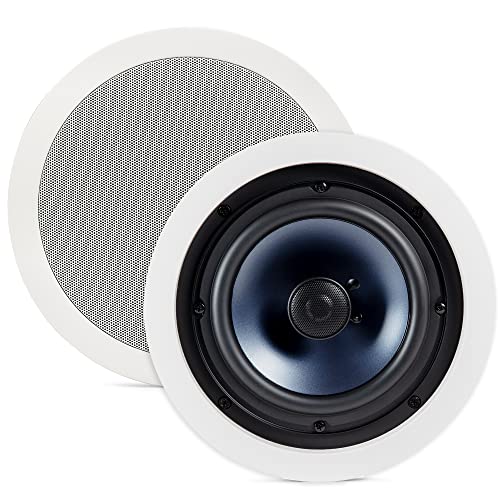
Pros
- Two-way design listed for in-ceiling use
- Round 8-inch format for ceiling placement
- Pair supplied for stereo placement
- White finish suits white ceilings
Cons
- In-ceiling installation may require cutting and access above the ceiling
- Unspecified ceiling depth may limit fit in some ceilings
The Polk Audio RC80i suits buyers who want a discreet, permanent in-ceiling stereo pair in a white finish. Confirm your ceiling depth, access and mounting plan before buying, since the supplied record does not include installation or performance details.
- Speaker type: 2-way in-ceiling speaker
- Size: 8-inch round
- Quantity: pair
- Finish: white
Root Cause Engineering & Mechanical Principles
Dolby Atmos renders sound objects in three-dimensional space, and the height layer of a 5.1.4 system depends on four overhead drivers that reproduce cues arriving from above the listener. Those cues are interpreted by the auditory system through interaural time differences, interaural level differences, and spectral filtering from the pinnae. When a height speaker is mispositioned, the elevation angle shifts, the arrival time at each ear changes, and the rendered object migrates toward the front or rear wall rather than sitting overhead. The Dolby Laboratories Audio Standards specify the reference geometry that a compliant installation should approximate, and understanding why those numbers exist is the first step toward a correct installation. For detailed technical setup and system integration, reference our analysis on calibrate sound level meters for atmos rigs (2026).
The root cause of most height-channel complaints is not a defective driver but a geometric error compounded by room acoustics. Ceiling joists, insulation, and drywall thickness alter the effective baffle, which changes the high-frequency off-axis response. Because in-ceiling drivers are typically aimed downward at the listening area, a modest deviation in aim angle produces a measurable loss of directivity above 4 kHz, which is the band most responsible for perceived elevation. Ceiling reflections from the room’s own surfaces can also mask the intended cue if the speaker is placed too close to a wall, creating a comb-filter pattern at the ear.
| Symptom | Likely Failure Mode | Diagnostic Gauge / Multimeter Tolerance | Resolution Difficulty |
|---|---|---|---|
| Overhead sound pulls toward front wall | Height driver placed too far forward (horizontal offset > 30°) | Laser angle within ±5°; tape measure offset within ±0.1 m | Low — reposition housing |
| Height effect is weak or absent | Driver aimed too steeply or too shallowly (elevation outside 30°–45°) | Inclinometer reading within ±2° | Low — adjust aim bracket |
| Uneven level between left and right height channels | Mismatched driver sensitivity or wiring polarity error | Continuity 0.1 Ω or less per leg; SPL difference ≤ 1 dB | Medium — verify wiring and gain |
| Harsh or metallic top-end | Driver mounted against joist or insulation pressure | Visual and tap-test inspection; check fixture torque | Medium — remount with bracing |
| Intermittent dropouts | Loose terminal or cable fatigue at fixture | Resistance under 0.5 Ω at terminal; no open circuit | Medium — re-terminate |
| Imaging collapses to ceiling center | Excess overhead gain or incorrect Atmos speaker layout in processor | Test-tone SPL within ±1 dB of reference level | Low — recalibrate AVR |
Step-by-Step Diagnostic & Calibration Procedure
Begin with the room geometry before touching any fixture. Measure the primary listening position’s ear height, which is typically 1.0 m to 1.2 m above the finished floor for seated listening. Record the ceiling height at the listening position; for a standard 2.4 m ceiling, the height speakers should target a distance of approximately 1.2 m to 1.8 m above the ears, which yields an elevation angle near 35° to 45° from the listener to the driver center. Mark the four height positions on the ceiling with painter’s tape, using the ITU-style rectangle as the default: front height channels placed roughly 30° forward of the listener axis, and rear height channels placed roughly 110° to 135° around the listener in plan view.
Step 1: Establish the reference plane. Use a digital level or laser line to confirm that the ceiling is level within ±3 mm across a 1 m span before cutting or aligning any housings. Step 2: Measure the plan-view offsets. From the listening seat center, measure the horizontal distance to each candidate position and compute the angle using the arc tangent of lateral offset divided by forward distance. Keep the front height channels within 0° to 30° and the surround height channels within 110° to 135°, with left and right pairs mirrored to within ±0.1 m. Step 3: Verify elevation. Place an inclinometer on the driver baffle or use a laser aimed at the listening ear. Adjust the aim bracket until the elevation angle is 35° to 45°, holding ±2° tolerance. Step 4: Confirm distance balance. Using the AVR’s speaker-distance setting, measure each height speaker distance in meters and enter it accurately; the processor will time-align all channels so arrival differences remain under 1 ms when properly set.
Step 5: Check fixture torque and mounting. Secure the in-ceiling housing with the manufacturer’s specified clamp screws, typically torqued to 1.5 to 2.5 N·m, taking care not to deform the baffle or crush insulation. Confirm the driver is seated flush and the grille is not contacting the drywall. Step 6: Verify electrical integrity. With the amplifier powered off and the speaker disconnected, measure conductor resistance; a healthy run should read under 0.5 Ω for runs under 30 m using 14 AWG conductor. Confirm polarity by applying a low-level 1.5 V DC check briefly to each leg and observing the cone motion direction, positive to positive. Step 7: Calibrate levels. Run the AVR’s automated calibration with a calibrated measurement microphone positioned at ear height at the primary seat. Target each height channel at the same SPL as the front left and right channels within ±1 dB at 1 kHz, and set the height channel trim accordingly.
Step 8: Validate the rendered cue. Play a test object panned from front-center to top-center at a steady level. The sound should travel smoothly overhead without a noticeable jump at the midpoint. If the cue appears to collapse, return to Step 3 and re-check elevation, as the most common error is an aim angle that is too shallow for the ceiling height.
Tools, Calibration Equipment & Component Replacement
A reliable height-channel installation requires a short, specific toolkit. A digital inclinometer with ±0.1° resolution is essential for verifying elevation. A laser distance meter accurate to ±1 mm provides fast offset measurements. A calibrated measurement microphone with a flat response to 20 kHz, paired with the AVR’s auto-calibration software, establishes level matching. A digital multimeter capable of reading resistance to 0.01 Ω supports continuity and polarity checks. A torque driver covering 1 to 3 N·m ensures clamp screws are not over-tightened, and a stud finder with joist detection prevents mounting into structural members where a housing cannot be seated correctly. For detailed technical setup and system integration, reference our analysis on decouple subwoofers from condo hardwood floors (2026).
When a component must be replaced, match the driver’s nominal impedance, sensitivity, and power handling to the existing front speakers, typically 6 to 8 Ω and sensitivity within 2 dB, so the height layer does not require excessive gain compensation. Replace damaged in-ceiling baffles with the same model whenever possible, because baffle depth and cutout dimensions are engineered for specific driver diameters. Use 14 AWG or heavier conductor for runs under 30 m and 12 AWG for longer runs, and terminate with crimped spade or banana connectors rated for the current draw of the amplifier channel.
Preventative Maintenance & Long-Term Reliability Protocols
Height speakers are concealed and rarely inspected, so a scheduled maintenance routine prevents gradual degradation. Every twelve months, power down the system and verify that each in-ceiling grille is seated and that no drywall fasteners have loosened the housing. Re-measure terminal resistance and confirm it remains under 0.5 Ω, since oxidation or terminal creep can raise resistance and cause intermittent dropouts. Check that clamp screws retain their specified torque of 1.5 to 2.5 N·m and tighten within that range if they have backed off.
Re-run the AVR calibration after any renovation, ceiling repair, furniture change that alters reflections, or amplifier replacement, because level and delay settings depend on the acoustic environment and the output stage. Keep the ambient humidity between 35% and 55% where possible, since extreme moisture can warp drywall around the housing and shift driver alignment. Document the final angles, distances, and calibration values in a installation log so that any future technician can restore the exact geometry without repeating the full procedure.
Frequently Asked Questions
What is the correct elevation angle for Dolby Atmos height speakers?
The recommended elevation angle from the primary listening position to the center of each height driver is approximately 35° to 45°, with a tolerance of ±2° during installation. This range places the effective sound source high enough to create a convincing overhead cue while avoiding the excessive steepness that can cause the sound to appear directly above the head with reduced spatial spread. In rooms with unusually high or low ceilings, adjust the horizontal offset and aim so that the elevation remains within this window.
How far apart should the front and rear height speakers be placed?
Front height channels should sit roughly 30° forward of the listener axis in plan view, while rear height channels typically sit between 110° and 135° around the listener. Left and right pairs must be mirrored to within ±0.1 m of their intended positions. Measure from the primary seat center rather than the room center, because the listening position is the reference point for the entire rendering system and for time alignment. For detailed technical setup and system integration, reference our analysis on shield long subwoofer rca runs against 60hz hum (2026).
Why do my height channels sound louder or quieter than the front speakers after calibration?
Height channels can measure differently because of driver sensitivity variation, ceiling cavity acoustics, and off-axis response loss above 4 kHz. Confirm that the calibration microphone is at ear height and that each channel was measured with the same method. If a height channel remains more than 1 dB off the front reference at 1 kHz after automated calibration, check terminal resistance and polarity first, then apply a manual trim within the AVR’s height-level adjustment range. Persistent imbalance often indicates a mismatched driver or a baffle that is pressed against insulation, which should be remounted with the housing seated freely.